Building Out Your AI Workflows
Let's go beyond using AI for simple tasks and redesign how our work gets done!


Hey, Talent Code fam! I’ve really appreciated the great response to my practical AI series! Apparently you guys like things as grounded and as useful as I do!
This week should be a great continuation of the series, but before we dive in, there are a couple things I want to hit, one that I need your help with, and two, if you’re in the Austin or Charlottesville areas, are opportunities to connect!
✅First, I need your vote! Not for office (shudder). A few of my colleagues and I have submitted a talk proposal for the Grace Hopper Celebration this fall, and we’d love your support. If you’re in the tech and talent space, you know GHC is one of the most important gatherings of the year—and we think we have something genuinely valuable to bring to that stage.
Head over to GHC Session Voting and give us a click for The AI Talent Paradox: Protecting Early-Career Pathways in Tech. It takes two minutes and means the world. Thank you! 🙏
🗣️Speaking announcement 1: 1-2 April, come find me at UT Austin! I’ll be at the UT Austin Voice Conference, talking all things people analytics and employee listening. Let me know if you’re going to be there, and let’s connect! You can find more information about UT Austin Voice here!
🗣️Speaking announcement 2: 3-4 May, come find me in Charlottesville, Virginia! I’ll be at GITEC 2026—and if you’re going to be there too, let’s connect! I’m also planning to make a pilgrimage to Aerial Resupply Coffee while I’m in town to see what coffee (and people) Mike Klemmer is roasting. Reach out and let’s grab a cup!
Now, on to this week’s topic, because I think it’s going to be one that, if you’re really looking to adopt AI and you haven’t yet, will change how you implement it in your work—because we’re going to take a look at the whole process plus AI, not just AI.
So let’s decode it. 🚀
Let’s Build an AI Workflow
The real opportunity isn’t in the individual task, but in the whole loop.

Here’s a question I want you to sit with for a second.
When was the last time you thought about how you prepare for an important meeting?
Not whether you prepare. I’m sure you do. But the actual mechanics of it — where you look for background, how you pull together context, what you do with your notes afterward, how you track the things you said you’d do?
For most of us, the honest answer is: we haven’t thought about it. We just…do it. The same way we’ve always done it. Maybe a little Googling, maybe a scan of old email threads, maybe a frantic scroll through notes five minutes before the call starts. And then afterward, some combination of memory, sticky notes, and optimism to follow through on what was discussed.
That’s not a workflow. That’s a habit. And habits don’t have to stay that way.
This is what I actually mean when I talk about using AI in your work. Not just dropping individual tasks into a chatbot. Not just asking it to rewrite an email or summarize a document (though those are fine starting points). I mean redesigning the way recurring work gets done, with AI woven into the loop at the points where it can add the most value.
That’s a different kind of thinking. And it’s what this article is about.
Rethinking our workflows with AI as a partner.
We’ve spent several issues now building up your AI toolkit — understanding what AI is, how to get started, how to teach it, and how to build with it. If you’ve been following along, you’re probably using AI for things like drafting emails, summarizing documents, brainstorming outlines, or organizing stuff around the house (anyone try the fridge example? that’s my favorite).
But I want to challenge you to take the next step.
The people who get the most out of AI aren’t the ones who use it for the most individual tasks. They’re the ones who use it to redesign how entire chunks of their work get done.
There’s a big difference between:
“I used AI to summarize this document” — a task
“I redesigned how I prepare for every important meeting, and AI is embedded in every stage of that process” — a workflow
The task saves you 10 minutes once. The workflow saves you hours every week, indefinitely, while making you consistently better at that part of your job.
So before we talk about AI, let’s talk about how to actually see your work differently.
Step 1: Pick the Process
Start with something you do repeatedly. Not a one-off project, a recurring process. The best candidates have some combination of these characteristics:
You do it frequently (weekly, if not more)
It requires gathering and synthesizing information from multiple places
It produces a structured output (a document, a decision, a communication, an action list)
It has a clear “before” and “after” — inputs that go in, outputs that come out
Parts of it feel mechanical or tedious even though the outcome really matters
Good examples for most professionals: meeting preparation, weekly reporting, onboarding new team members, reviewing project status, monitoring news or trends in your field, tracking deliverables across a team.
For this article, we’re going to use meeting prep. Most of us do it, most of us don’t love how to do it when we have to do it manually, and it’s one of my favorite examples of how I’ve used AI to transform an entire loop instead of just one step.
Step 2: Map the Process Honestly
Before you redesign anything, you need to understand what you’re actually doing right now. Not the idealized version. The real one.
For each process you want to redesign, ask:
What goes in? What information do you need to gather before this process produces useful output? Where does it live? How long does it take to find?
What comes out? What are you actually producing? A decision? A communication? A meeting? An artifact? Is that output clear and structured, or fuzzy?
What are the most mechanical, repetitive steps? Where do you find yourself doing the same kind of work over and over? Things like copying things from one place to another, reformatting, summarizing, looking up background information, translating raw notes into structured action items?
Where do things fall through the cracks? What parts of this process are most likely to fail or get skipped? What are the downstream consequences when they do?
Where does human judgment actually matter? Not everything should be handed to AI. Where in this process do context, relationships, and professional judgment make the real difference?
That last question is important. Workflow redesign isn’t about removing yourself from your work. It’s about removing you from the parts of your work where you’re not actually adding value, so you can show up fully for the parts where you are.
One of the first articles I wrote on The Talent Code was about figuring out what work you should be doing vs. outsourcing to automation, and the framework still holds:
Step 3: Redesign Around the Loop
Now here’s where it gets interesting. Once you’ve mapped the process, you can see the whole loop, the full arc from inputs to outputs to follow-through. And you can start asking: where does AI actually fit?
I want to walk you through my own meeting preparation workflow, because I think it illustrates the concept better than any abstract framework.
The Meeting Prep Workflow (A Real Example)
Here’s how I actually prepare for important meetings now, using AI as a genuine collaborator throughout the entire loop.
Stage 1: The Weekly Scan
Every week, I do a quick pass through my upcoming calendar and flag the meetings that actually require preparation: the ones where I’m meeting someone new, resuming a conversation after a gap, walking into a negotiation or decision point, or representing my organization in a way that matters.
This is human work. It takes judgment to decide which meetings warrant prep. AI doesn’t do this part.
Stage 2: Feed the Context
For each flagged meeting, I gather the relevant raw material and bring it to Claude. Depending on the meeting, that might include:
Previous email threads with the person or organization
Documents related to the topic we’re discussing
Notes from our last conversation
Or nothing from me at all—if it’s a first meeting with an organization or a person I haven’t met before, I ask Claude to search for background on them
What I’m doing here is feeding the context in. I’m not asking Claude to make decisions or generate content out of thin air. I’m giving it the raw information and asking it to do the synthesis work, the kind of work that would otherwise require me to spend 20–30 minutes reading through old threads and piecing together context.
Stage 3: The Prep Summary
From that raw material, I ask Claude to build me a structured meeting prep summary. What I want in that summary:
Who am I meeting and what do I know about them (role, organization, relevant background)?
Where did we leave off last time — what was discussed, what was agreed?
Did we deliver on the commitments we made?
What are the key things I need to cover in this meeting?
What are the smart questions I should be asking?
That summary gets put into a calendar event — a 30-minute prep session the day before or morning of the important meeting. Not just the summary itself, but a dedicated block of time on my calendar to review it.
That’s the key design decision. A summary that lives in a chat window might get missed. A calendar event that shows up as a reminder at the right time, with the prep material attached, actually changes my behavior. The design of the workflow matters as much as the AI work inside it.
Stage 4: The Meeting
This is the human part. I show up prepared. I’m not scrambling to remember context five minutes before the call. I already know what I want to cover and what I want to ask.
Stage 5: Post-Meeting Follow-Through
Here’s where a lot of workflows fall apart and where AI can close the loop in a way that makes the whole system actually work.
After the meeting, I take the meeting notes or summary and bring it back to Claude. From that, I ask for two things:
Task extraction: What tasks came out of this meeting? Who owns each one? What’s the timeline?
Calendar actions: For tasks assigned to me, get them on my calendar. For tasks assigned to others, create a follow-up reminder so I’m not relying on hope as a follow-up strategy.
This is the part most professionals skip — or do badly. We leave the meeting with a mental list of things to do, and then life happens, and the list dissolves. Building the follow-through into the workflow, and letting AI do the mechanical work of extracting and organizing the task list, closes the loop.
As an example, here are the prep notes I created from previous emails, my personal statement, my notes from previous discussions, and a lot of verbal stream-of-consciousness I gave my AI partner-in-crime Friday (she’s an amalgamation of several models and about 16 agents and she runs my home-not-Army life) about research partnership and education opportunities at the University of Miami. I instructed her to put a reminder for key logistics, who I was meeting with and key bio information (in this case, research that overlaps with my research interests), talking points from my personal statement for the program, and questions/opportunities for follow-up.
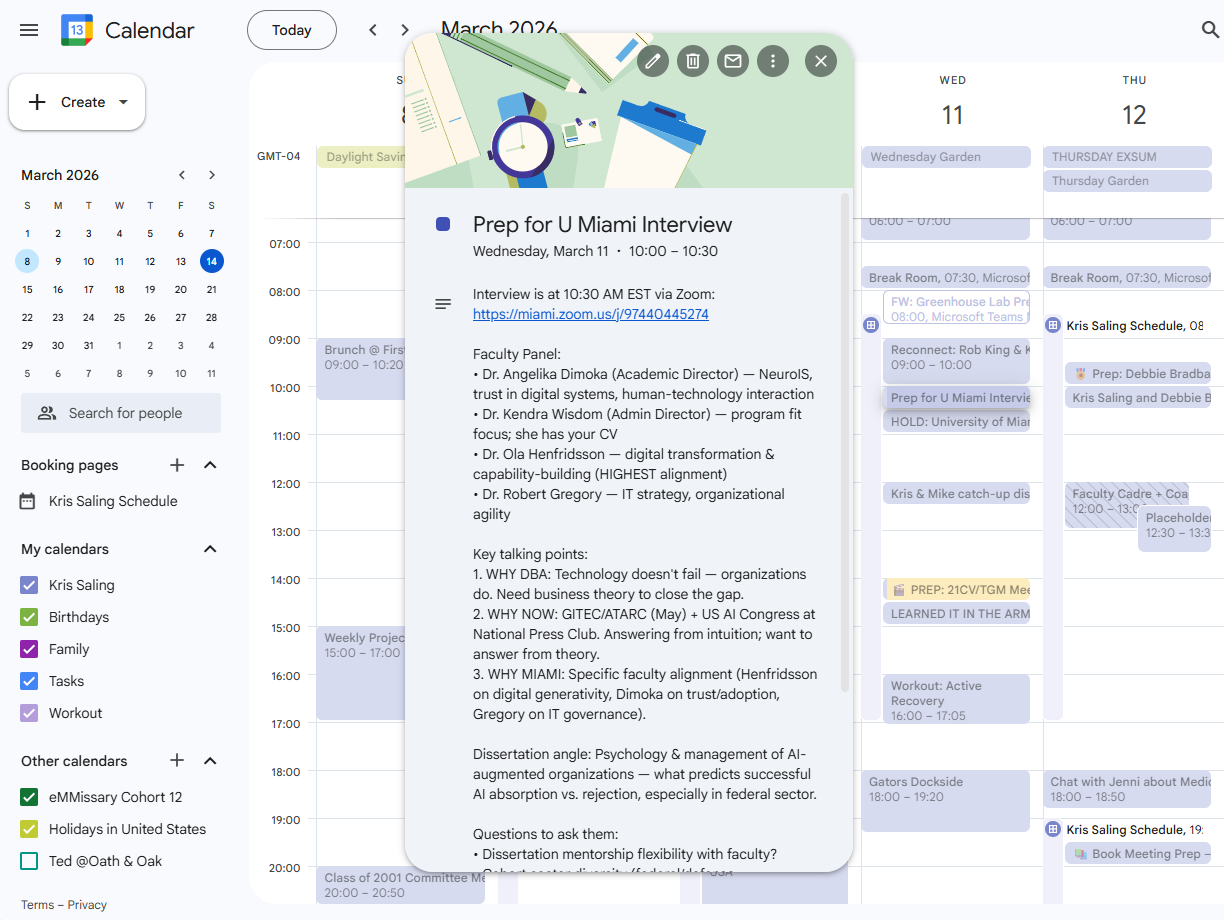
My calendar has a lot of these prep notes in them, and they are lifesaving. I absolutely hate going into a meeting not knowing who I’m meeting with and why and having a very clear plan for what success looks like for that meeting. I don’t have time for a meeting that wastes time, and I don’t like doing that to anyone else (there are gaps on this calendar, but this is just my personal calendar—my work one is worse!).
What Makes This a Workflow (Not Just a Series of Tasks)
Notice what’s happening here. This isn’t me using AI for a single task and moving on. It’s a loop:
Scan → Feed context → Synthesize prep → Prep reminder → Meeting → Extract tasks → Follow-through
AI is embedded at three specific points in that loop: synthesizing context, building the prep summary, and extracting tasks. The human judgment lives at the front (deciding which meetings matter) and in the meeting itself (relationships, decisions, tone). The handoffs are deliberate. The outputs flow into the next stage.
That’s what a redesigned workflow looks like.
Two More Workflows Worth Redesigning
Meeting prep is one example. Here are two more that follow the same logic: a clear loop, recurring work, mechanical steps that AI can handle, and human judgment preserved where it actually matters.
Workflow 2: The Weekly Intelligence Brief
The process: Most leaders and professionals need to stay current in their field. But “keep up with what’s happening” is a wish, and wishing is not a course of action. Without structure, it either eats your morning (endless scrolling) or doesn’t happen.
What goes in: Topics you need to follow: industry news, policy changes, competitor moves, key people in your space, whatever is relevant to your role.
What comes out: A brief, structured summary of what’s worth knowing this week, with enough context to actually be useful in conversations and decisions.
Where AI fits: You set up a recurring prompt with your topic list. Your AI tool searches, synthesizes, and builds the brief. You spend 10 minutes reading a structured summary instead of an hour scattered across news tabs. You add your own judgment about what’s signal versus noise, but the gathering and organization is done for you.
The design decision: Like meeting prep, the brief should land somewhere you’ll actually see it. A recurring calendar event, a standing document, a weekly email to yourself, whatever your actual habits support.
The feedback and partnership: Explore topics that need to be discussed, ones you’re going to write about more extensively, or teaching points. Have your AI tool add those to your calendar, build outlines for point papers, do deep research to pull more articles on the topic, and store all of that somewhere you’ll get to it with a calendar reminder on different days to either do the research or write.
Workflow 3: The Project Pulse Check
The process: Anyone managing a project, a team, or a portfolio of work faces the same recurring problem: things are happening in lots of places simultaneously, and staying on top of it without living in your inbox is a constant challenge.
What goes in: Status updates, meeting notes, emails, task lists, the scattered raw material of project activity.
What comes out: A structured summary of where things stand: what’s on track, what’s at risk, what decisions need to be made, what’s overdue.
Where AI fits: You gather the raw material (or, if you’ve built connectors to your project tools, much of this can be pulled automatically) and ask your AI tool to synthesize it into a coherent pulse check. Instead of a 30-minute status review, you have a five-minute read.
The design decision: The pulse check becomes most powerful when it’s consistent. Same format, same cadence, same audience. When the structure is stable, the signal is easier to read, including the signal of things that are missing or slipping.
The feedback and partnership: I use Notion to track a lot of my projects, so as you’re going through what’s been done, after you follow up with your team for any clarification, have your AI tool write back to your Notion page for each part of the project and make sure next steps and due dates are updated appropriately. Notion can create Kanban boards and can move project pieces to different parts of the Kanban board for completeness or action as well.
I like using Notion to provide me a This Week view, where I can see everything that has to be actioned by me this week. Once a week, I activate a prompt that turns that into a morning review that I read Monday along with my morning news update brief (or Notebook LM turns into something I can listen to while walking my dog) so that I can make sure I know what to focus on.
Another prompt I use for this: You are my business productivity coach. Looking at all the tasks I have to accomplish this week and what unstructured time I have, tell me what three tasks I should work to accomplish above all others and why? Give me these tasks in priority order along with reasoning, expected duration, and identify at least two spots for each on my calendar where I can tackle these. Be direct and focused.
The Pattern
All three of these workflows follow the same pattern:
Inputs — what raw material goes in, where it comes from
AI synthesis — where the mechanical, pattern-matching, synthesis work happens
Human review — where your judgment, context, and relationships are applied
Output — what gets produced, in what format, delivered where
Follow-through — how the output connects to the next action or the next loop
That’s your redesign template. Pick a recurring process. Map it against those five elements. Find the synthesis step where AI can do work that currently drains your time. Build the output into something that actually fits your workflow. And close the loop.
Try It Yourself
Here’s your prompt. Take it to the AI of your choice, customize the bracketed sections, and let it help you design your workflow before you start building it.
✳ Prompt: Design My AI Workflow
Act as a workflow design consultant helping a non-technical professional redesign a recurring work process using AI.
(Customize this section): I work in [your role / organization type]. The recurring process I want to redesign is: [describe the process: what it is, how often you do it, roughly how long it takes, and why it matters]. Currently, the way I do this is: [describe your current approach as honestly as you can, where you gather information, what you produce, what tends to fall through the cracks].
Help me:
Map the process into its key stages (inputs → synthesis → output → follow-through)
Identify the 2–3 points in the process where AI can do the most valuable work
Identify where human judgment should stay in the loop and why
Design a practical end-to-end workflow with AI embedded at the right points
Suggest how the output should be formatted and delivered so that it actually fits my work habits
Keep the language practical and non-technical. Focus on what I actually do, not what I theoretically should do.
Here’s what I want you to take away from this: AI isn’t most powerful when you use it as a better search engine or a faster way to draft things. It’s most powerful when you step back, look at the recurring work in your week, and ask…what would it look like if this whole loop ran better?
That question is worth a few hours of your time. The answer will save you far more than that.
As always, I’d love to hear what you build. Hit reply and tell me what workflow you’re trying first!